Zero Prompt Overhead Out-of-band disk telemetry for active agent sessions

Real-time context telemetry for Google Antigravity.

Stop guessing your context burn. Monitor live token velocity, pinpoint payload bloat from rogue file dumps, and orchestrate multi-agent swarms directly in your IDE auxiliary pane — with zero model tokens consumed.

$ git clone https://github.com/jaytaykay/antigravity-context-monitor.git "$env:USERPROFILE\.gemini\config\plugins\context-monitor"
Test Live Simulator
0 Model Tokens Used
3s Live Update Cadence
1.0M & 2.0M Auto-Detected Limits
100% Local & Private
Google Antigravity — Autonomous Workspace [Active]
Auxiliary Side Pane (Docked)
main.mjs PRODUCT.md
1import { DatabaseSync } from 'node:sqlite';
2import { readFileSync } from 'node:fs';
3
4// Non-interruptive local telemetry
5export function pollContextBurn() {
6 const raw = readFileSync(TRANSCRIPT_PATH);
7 return computeBurnVelocity(raw);
8}
AG Antigravity Agent Turn 24 • Autonomous
"Reading large repository schemas and compiling test suites..."
Zero prompt tokens consumed by monitor
CONTEXT MONITOR
3s LIVE
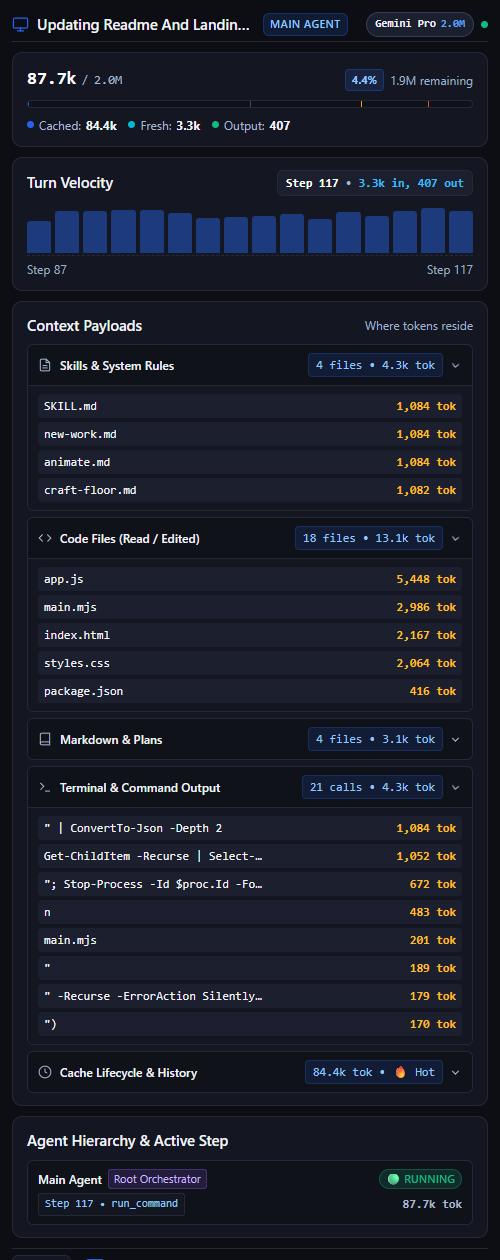
Context Monitor real-time telemetry panel docked in Antigravity

Test the telemetry engine in real-time

Simulate realistic multi-turn agent activity. Watch the capacity meter fill, hover over velocity sparkbars to inspect instantaneous token spikes, and trigger subagent spawns without leaving this page.

Simulator Controls Gemini Pro 2.0M
Simulate Agent Invocations
The live plugin auto-detects these exact model events in reverse from your IDE session logs without any user prompt overhead.
Autonomous Workflow Engine MAIN AGENT
Gemini Pro 2.0M
87.7k / 2.0M
4.4% 1.9M remaining
Cached: 84.4k Fresh: 3.3k Output: 407
Turn Velocity Step 117 • 3.3k in, 407 out
Step 87 Step 117 (Latest)
Agent Fleet 2 Active Workers
Architecture Researcher Subagent
⚪ IDLE
Telemetry Engine Optimizer Subagent
🟢 RUNNING

Built for heavy, multi-hour agent sessions

Designed to withstand complex coding migrations, large codebase reviews, and multi-agent parallelism without losing track of your token budget.

01

Interactive Turn Velocity Graph

Every agent turn is measured in real-time. The 16-step sparkbar graph provides instantaneous visual telemetry of token consumption spikes.

  • In-Graph Header Sync: Hovering any sparkbar updates the exact input and output token count directly inside the header without awkward mouse tooltips.
  • Step Inspector Drawer: Click any sparkbar to open a deep payload breakdown of that exact turn, revealing which tool calls or file chunks caused the spike.
  • Proportional Severity Anchors: Bars highlight elevated (amber) or critical (red) thresholds to warn you of runaway loops.
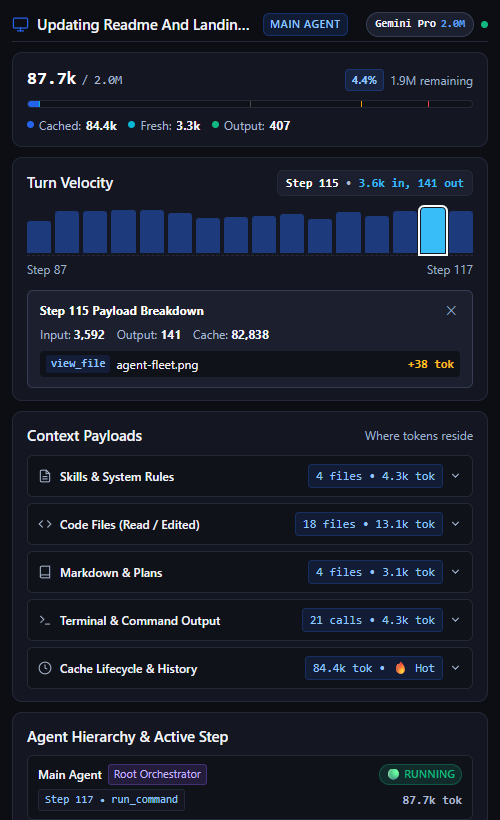
Context Monitor Turn Velocity graph and step inspector
02

Progressive Payload Attribution

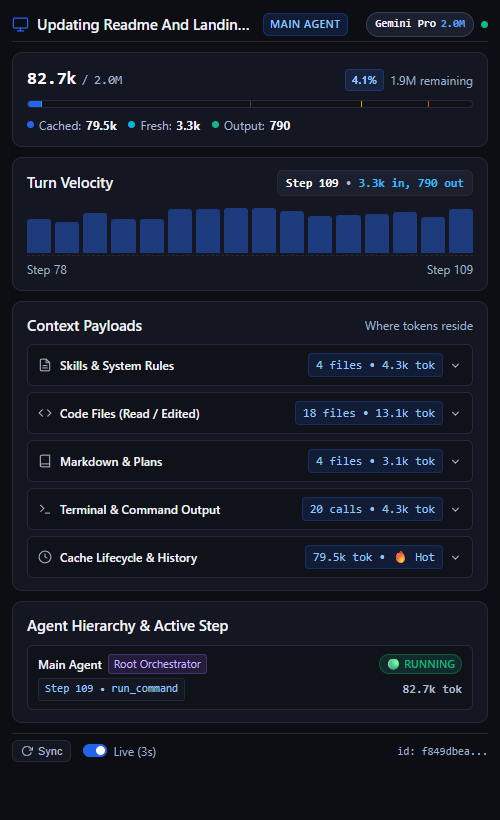
Know where tokens actually live. Instead of an opaque single number, five progressive drawers categorize every token in context:

  • Skills & Instructions: System prompts, workflow definitions, and tool declaration overhead.
  • Code Files: Exact token counts for all source code read and edited in the session.
  • Markdown & Plans: Implementation plans, specs, and conversation artifacts.
  • Terminal & Commands: Shell outputs, compiler errors, and command line dumps.
  • Prompt Cache Warmth: Real-time cache hit rate tracker, elapsed response counter, and warm window timer.
Categorized Context Payload Attribution Accordions
03

Agent Fleet & Subagent Tracking

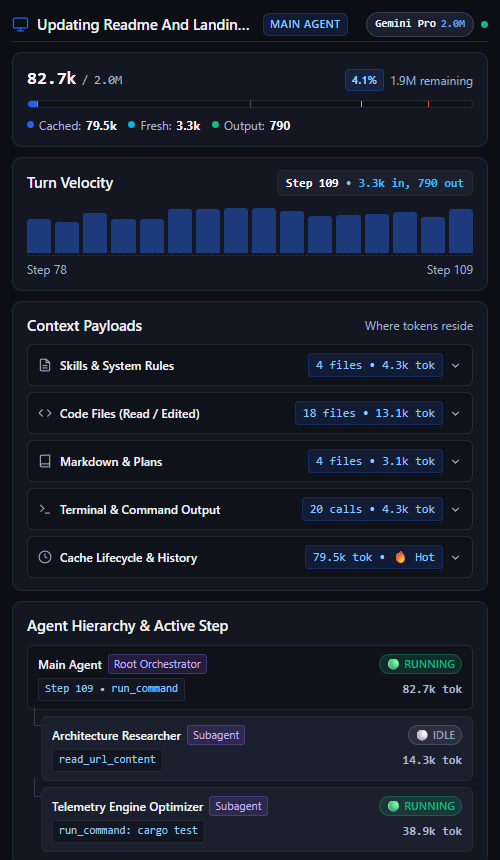
Modern agentic coding uses swarms of parallel subagents. Context Monitor gives you first-class cockpit visibility into the entire agent tree.

  • Hierarchy Connectors: Real-time tree view linking the Root Orchestrator to background child subagents.
  • Live Execution States: Instant green (RUNNING) and grey (IDLE) status indicators for background processes.
  • Active Tool Surveillance: Displays what command or file operation each subagent is actively executing.
  • Isolated Subagent Contexts: Monitor individual token accumulation before launching new parallel tasks.
Multi-Agent Hierarchy and Subagents Tracking Tree

Zero API tokens. Zero prompt interruptions.

How Context Monitor achieves total out-of-band telemetry without polluting your context window.

1. Local Transcripts & SQLite

Antigravity writes conversation logs directly to disk (`transcript.jsonl` and `conversation_summaries.db`). Context Monitor streams these files using native Node.js zero-dependency file and SQLite readers.

2. Out-of-Band Sidecar

The sidecar runs as an independent daemon. It never injects prompt messages into the agent's turn loop and never consumes LLM inference tokens. Telemetry calculations happen in pure local V8 microsecond routines.

3. Native Side Pane View

The webview docks directly in Antigravity's auxiliary side pane. Telemetry refreshes every 3 seconds with zero flicker, tabular numbers, and surgical contrast designed to match the Antigravity dark theme.

The Telemetry Contrast

Capability Context Monitor CLI Commands (e.g. /context) Unmonitored Agentic Runs
Model Token Cost 0 Tokens Consumes turn prompt budget 0 Tokens (Unknown burn)
Agent Flow Interruption Zero Interruption Pauses prompt loop Sudden compaction failure
Turn Velocity Sparkbars 16-Step Live Sparkbars None (Static snapshot) None
Payload Categorization Skills / Code / Docs / Shell Unstructured text dump None
Subagent Fleet Hierarchy Full Tree with Tool State Root agent only Invisible subagent burn
Prompt Cache Warmth Hit Rate + Warm Window Not exposed Unpredictable cold re-evals

Install in under 30 seconds

Clone directly into your Antigravity plugins directory or launch standalone in your browser.

Option A

Install as Antigravity Plugin

Docks directly inside Antigravity's auxiliary side pane.

git clone https://github.com/jaytaykay/antigravity-context-monitor.git "$env:USERPROFILE\.gemini\config\plugins\context-monitor"
1 Type /context-monitor in chat to summon the side pane pill.
2 Or select Context Monitor from the IDE Extensions menu.
Option B

Run Standalone Preview

Open in any browser to inspect sessions or test offline.

git clone https://github.com/jaytaykay/antigravity-context-monitor.git
cd antigravity-context-monitor
npm start
1 Open http://127.0.0.1:3456/ in any desktop web browser.
2 Zero external npm dependencies required (uses built-in node:sqlite).